Ask it, build it, automate it, own it.
La interfaz moderna de base de datos para equipos
Describe lo que necesitas: agentes de IA y automatizaciones se encargan del resto, sobre PostgreSQL real. Totalmente gestionado, o en tus propios servidores.
Empezar gratis- filas por base
- Millones
- tipos de vista
- 6
- tipos de campo
- 28
- para empezar
- 5 minutos
- Describe lo que necesitas
- Esquema de datos
- Tablas vinculadas
- Interfaces
- Automatizaciones
- Agentes de IA
- Publicación en tu dominio
Pipeline de generación
De la necesidad a la aplicación, en una conversación
Los datos pasan de etapa en etapa: cada propuesta se aprueba antes de empezar la siguiente.
Análisis
Blueprint
Tablas
Relaciones
Interfaz
Automatizaciones
Agentes de IA
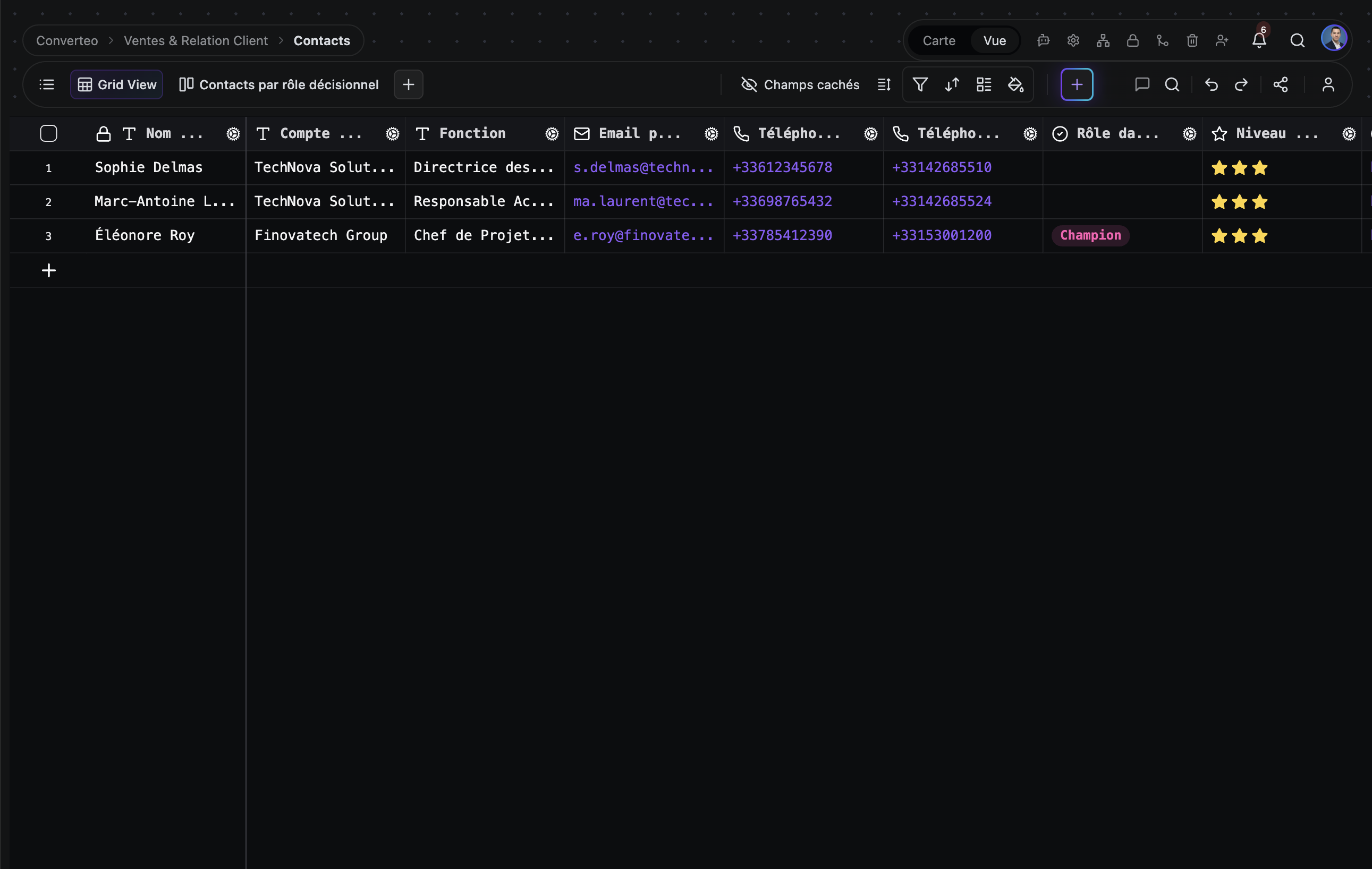
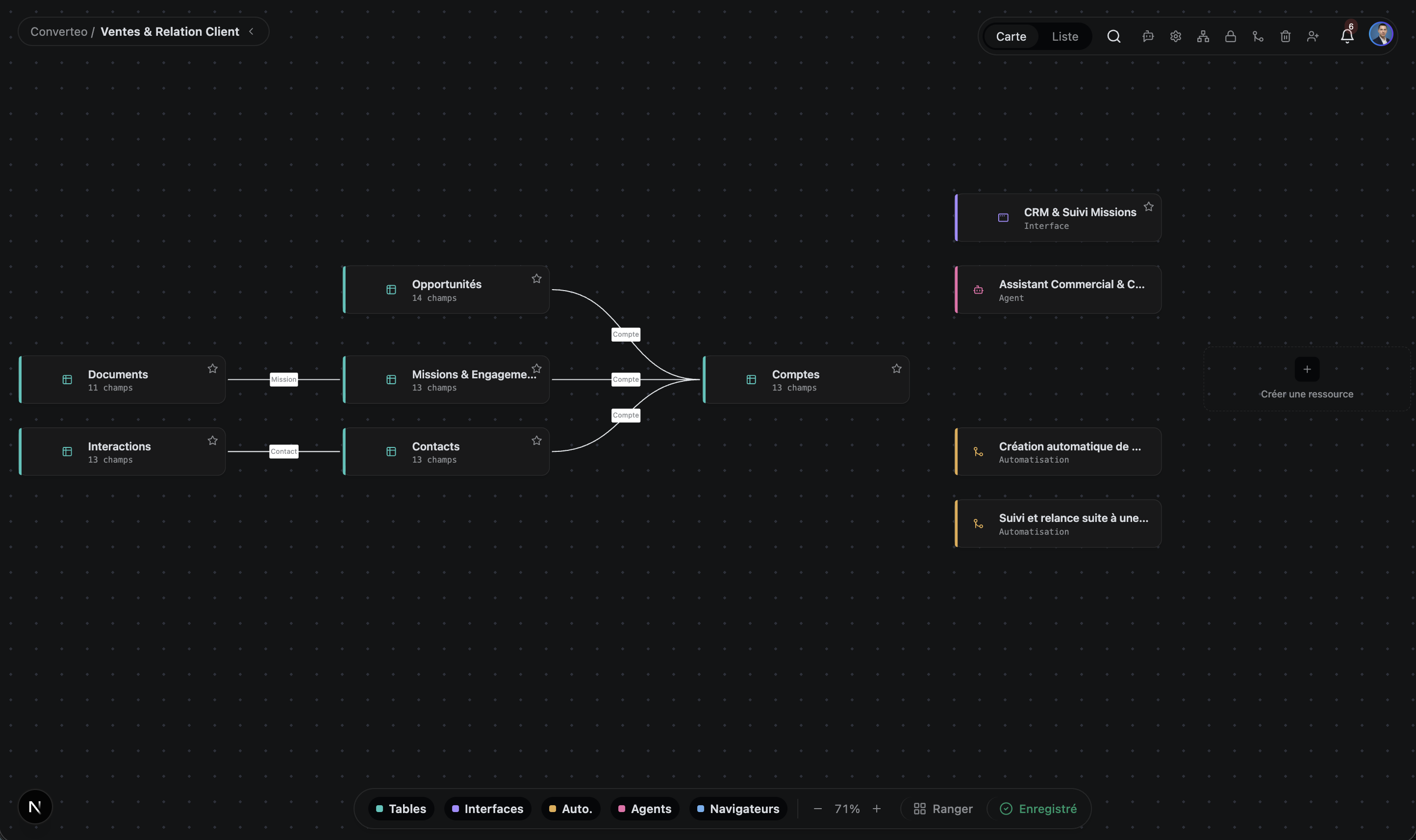
Esto es TblFlow de verdad
No son maquetas: capturas de la interfaz real, con datos reales.
Visión general
Una plataforma, seis superficies
Sus datos estructurados se convierten en software funcional, sin salir de la plataforma.
Tablas
Bases con varias tablas, 28 tipos de campo, registros vinculados, fórmulas con más de 200 funciones, rollups y lookups. Cada celda se escribe en una tabla PostgreSQL real, sin formato propietario.
Apps
Un App Builder para publicar una mini-aplicación propia con su propia autenticación de visitantes y una API inyectada para leer y escribir registros.
Automatizaciones
Flujos de trabajo disparados por eventos o por cron, de varios pasos, con etapas de aprobación humana donde hacen falta. Flujos ilimitados; las ejecuciones mensuales dependen de tu plan — consulta los precios.
Grafo de conocimiento
Una biblioteca de documentos markdown con búsqueda semántica y de texto completo fusionadas, un grafo de enlaces entre documentos y un chunking que respeta la estructura del markdown.
Agentes de IA
Agentes autónomos con planificador, ejecutor, memoria persistente y programador. Leen y escriben tus datos y actúan sobre tus servicios conectados: Gmail, GitHub, Slack, Google Calendar.
OpenAI, Anthropic, Google, Azure, DeepSeek, Mistral, Groq, Cohere o tus propios modelos locales mediante Ollama y LM Studio.
Computer use
Cuando un servicio no tiene API, el agente maneja un navegador: abre la página, rellena el formulario, toma el resultado y lo escribe en tu tabla. Cada sesión queda grabada y sigue siendo auditable.
Funciona con los modelos que ya usas
En la nube o en local, conectados con tus propias claves API: sin dependencia de proveedor.
- OpenAI
- Anthropic
- Mistral
- Ollama
- + 5 más
Seis formas de ver la misma tabla
Cambie de vista sin duplicar ni una sola fila de datos.
Cuadrícula
Navegación y edición tipo hoja de cálculo
Kanban
Flujos por estado, tableros de proyecto
Galería
Registros con muchas imágenes, catálogos visuales
Calendario
Datos basados en fechas, planificación
Gantt
Cronogramas de proyecto, dependencias, ruta crítica
Formulario
Recoger datos de usuarios externos, mediante URL pública
Por qué TblFlow
Lo que las otras herramientas no hacen.
PostgreSQL de verdad, no una capa de sincronización
La tabla que ves en TblFlow es la tabla en Postgres. Puedes apuntar cualquier cliente SQL a la misma instancia y consultar tus datos directamente. No hay intermediario.
Agentes que actúan, no solo responden
Airtable, Monday y Notion no tienen agentes autónomos. TblFlow sí: vigilan tus datos y actúan — enviar un email cuando un trato cambia de etapa, abrir una incidencia en GitHub, resumir la semana cada viernes.
Autoalojable, sin dependencia
El plan Enterprise se despliega en tu propia infraestructura o en una VPC dedicada, a presupuesto, con todas las funciones desbloqueadas. Tus datos siguen en Postgres estándar: un pg_dump es una copia completa, reutilizable en otro sitio sin conversión.
Diseñado para volúmenes de producción
Filtra, ordena, agrupa y busca sobre millones de filas en menos de un segundo. La cuadrícula se dibuja en canvas y solo redibuja la zona visible, así que el rendimiento no se degrada con el número de filas.
API-first, desde tu primera base
Cada base que creas en TblFlow es accesible automáticamente mediante una API REST documentada (OpenAPI), con autenticación por token. No hay plan que desbloquear para eso: está disponible desde el plan Gratis.
Comparativa
Una comparativa detallada por herramienta, con criterios verificables y los casos en los que el otro producto gana.
Precios
Empiece gratis. Cambie de plan cuando su equipo crezca.
Gratis
Para evaluar y para proyectos personales.
Empezar0 €/mes
- 1 base · 1 espacio · 1 usuario
- 1 GB de almacenamiento · 5000 filas por tabla
- Agentes de IA y automatizaciones ilimitados en número — 100 ejecuciones/mes
- Soporte de la comunidad
- El más elegido
Pro
Para equipos pequeños que automatizan.
Empezar29 €/mes
≈ 26,58 €/mes
facturación mensualfacturación anual (319 €/año)
- 5 bases · 3 usuarios
- 100 GB de almacenamiento · 100.000 filas por tabla
- Agentes de IA y automatizaciones ilimitados en número — 5000 ejecuciones/mes
- Soporte por email · SLA del 99,5 %
Business
Para equipos que gestionan sus operaciones sobre TblFlow.
Empezar99 €/mes
90,75 €/mes
facturación mensualfacturación anual (1089 €/año)
- 30 bases · 10 usuarios
- 500 GB de almacenamiento · 1.000.000 de filas por tabla
- Agentes de IA y automatizaciones ilimitados en número — 50.000 ejecuciones/mes
- SSO / SAML · marca blanca · auditoría avanzada
- Soporte prioritario · SLA del 99,9 %
Enterprise
En tu infraestructura o en una VPC dedicada.
ContactarA medida
- Todo ilimitado
- Despliegue on-premise o en VPC
- SSO / SAML · marca blanca
- Soporte dedicado 24/7 · SLA del 99,99 %
Preguntas frecuentes
Lo que más nos preguntan.
¿Qué es TblFlow?
TblFlow es una plataforma de base de datos no-code que ofrece una interfaz tipo hoja de cálculo sobre una base de datos PostgreSQL real. Los equipos la usan para crear tablas, interfaces y paneles, automatizaciones, una biblioteca de documentos con búsqueda semántica y agentes de IA autónomos, todo sobre los mismos datos. TblFlow está disponible como servicio gestionado en tblflow.com y como despliegue autoalojado.
¿En qué se diferencia TblFlow de Airtable?
TblFlow se diferencia de Airtable en cuatro aspectos. Primero, los datos viven en una base PostgreSQL real que puedes consultar con SQL desde cualquier cliente, mientras que Airtable no expone acceso SQL. Segundo, TblFlow incluye agentes de IA autónomos que actúan sobre tus datos y servicios conectados, algo que Airtable no tiene. Tercero, añade búsqueda semántica sobre una biblioteca de documentos. Cuarto, TblFlow puede autoalojarse en tu propia infraestructura, algo que Airtable no ofrece.
¿Qué tipos de vista ofrece TblFlow?
TblFlow ofrece siete tipos de vista sobre cualquier tabla, sin duplicar los datos: Cuadrícula, Kanban, Galería, Calendario, Gantt, Formulario y Plugin. La vista Gantt gestiona cronogramas de proyecto, dependencias entre tareas y la ruta crítica. La vista Formulario genera una URL pública para recoger datos de personas ajenas a tu equipo.
¿Qué pueden hacer los agentes de IA de TblFlow?
Los agentes de TblFlow son autónomos: cuentan con un planificador, un ejecutor, memoria persistente en forma de grafo de entidades y relaciones, y un programador de tareas. Leen y escriben tus registros, consultan tu biblioteca de documentos como contexto y actúan sobre los servicios conectados: Gmail, GitHub, Slack, Google Calendar, Drive y Meet. También puedes darles herramientas personalizadas generadas a partir de cualquier especificación OpenAPI, o escribir tus propias herramientas en JavaScript ejecutadas en un entorno aislado.
¿Cuánto cuesta TblFlow?
TblFlow Cloud tiene cuatro planes. El plan Gratis cubre 1 base y 1 usuario. El plan Pro cuesta 29 € al mes y cubre 5 bases y 3 usuarios. El plan Business cuesta 99 € al mes y cubre 30 bases y 10 usuarios. El plan Enterprise es a presupuesto, elimina todos los límites y cubre además el despliegue en tu propia infraestructura o en una VPC dedicada.
¿TblFlow tiene un plan gratuito?
Sí. TblFlow Cloud tiene un plan Gratis permanente con 1 base, 1 usuario, 1 GB de almacenamiento y agentes de IA, automatizaciones y solicitudes de API ilimitados, sin tarjeta de crédito. El despliegue en tu propia infraestructura forma parte del plan Enterprise, a presupuesto.
¿Qué base de datos usa TblFlow?
TblFlow usa PostgreSQL, con la extensión pgvector para la búsqueda semántica y Redis para la caché y las colas de tareas en segundo plano. Cada tabla que creas en TblFlow es una tabla PostgreSQL física real, no una fila en un almacén genérico, y por eso puedes consultar tus datos directamente con SQL.
¿TblFlow tiene API?
Sí. TblFlow expone una API REST documentada mediante una especificación OpenAPI, con autenticación por token. Además, se inyecta una API de JavaScript en las apps publicadas con el App Builder, para que tu propio código pueda leer y escribir registros.
¿Qué proveedores de IA admite TblFlow?
TblFlow admite OpenAI, Anthropic, Google Gemini, Azure OpenAI, DeepSeek, Mistral, Groq, Cohere, cualquier endpoint compatible con OpenAI y modelos locales mediante Ollama y LM Studio. Los proveedores y modelos se configuran por base, con tus propias claves de API.
¿Cuántas filas puede manejar TblFlow?
TblFlow filtra, ordena, agrupa y busca sobre millones de filas con tiempos de respuesta por debajo del segundo: la cuadrícula se dibuja en canvas y solo redibuja la zona visible, así que el rendimiento de visualización no se degrada al crecer el número de filas. Las filas por tabla, en cambio, dependen del plan: 5000 en el plan Gratis, hasta 1.000.000 en Business, ilimitadas en Enterprise. El desglose completo está en la página de precios.
¿Dónde se almacenan mis datos?
Depende del despliegue. En TblFlow Cloud, tus datos están en infraestructura gestionada por TblFlow. En autoalojado o en Enterprise dedicado, están en tu propio PostgreSQL, en tu infraestructura o en una VPC dedicada, y TblFlow no tiene acceso a ellos. En ambos casos los datos se almacenan en PostgreSQL estándar, sin formato propietario.
¿Puedo exportar mis datos y marcharme?
Sí, y sin paso de conversión. Tus datos ya viven en tablas PostgreSQL estándar, así que basta un `pg_dump` y se importa en cualquier Postgres. No hay formato propietario que convertir ni capa de sincronización que desenredar. Eso es lo que significa «sin dependencia de proveedor» en este sitio.
¿TblFlow cumple el RGPD?
TblFlow está diseñado para un uso conforme al RGPD y ofrece registro de auditoría, historial de revisiones, permisos granulares y gestión del consentimiento. En autoalojado o en Enterprise dedicado, controlas por completo la ubicación de los datos, lo que simplifica el cumplimiento para organizaciones con requisitos de residencia de datos.
Ninguna pregunta coincide con esta búsqueda.
¿Listo para convertir sus datos en software?
Cree su primera base en pocos minutos.