Ask it, build it, automate it, own it.
L'interfaccia moderna per database, pensata per i team
Descrivi ciò di cui hai bisogno: agenti IA e automazioni si occupano del resto, su PostgreSQL reale. Completamente gestito, oppure sui tuoi server.
Inizia gratis- righe per base
- Milioni
- tipi di vista
- 6
- tipi di campo
- 28
- per iniziare
- 5 minuti
- Descrivi ciò che ti serve
- Schema dei dati
- Tabelle collegate
- Interfacce
- Automazioni
- Agenti IA
- Pubblicazione sul tuo dominio
Pipeline di generazione
Dal bisogno all’app, in una conversazione
I dati passano di fase in fase: ogni proposta viene approvata prima che inizi la successiva.
Analisi
Blueprint
Tabelle
Relazioni
Interfaccia
Automazioni
Agenti IA
Questo è davvero TblFlow
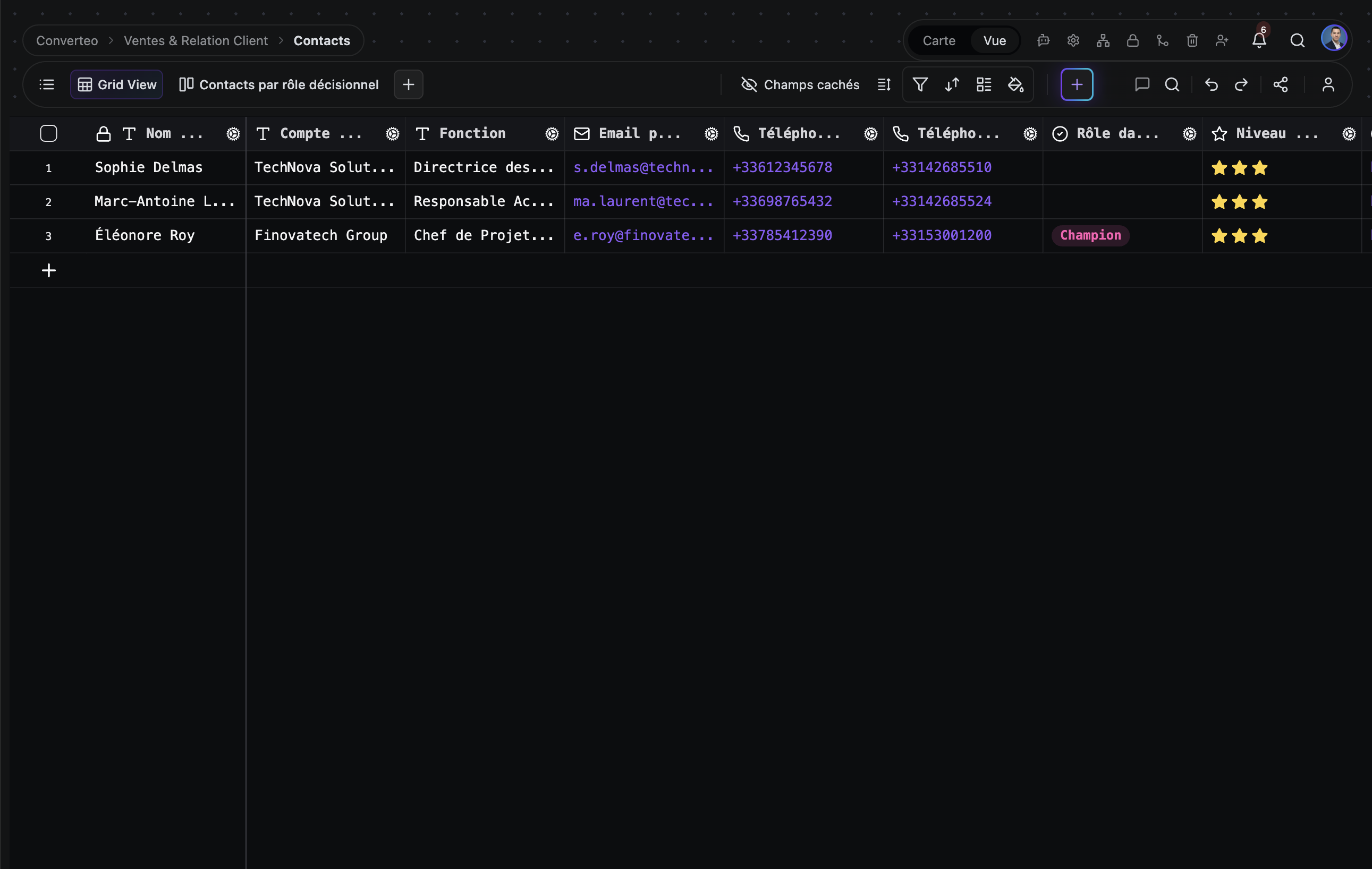
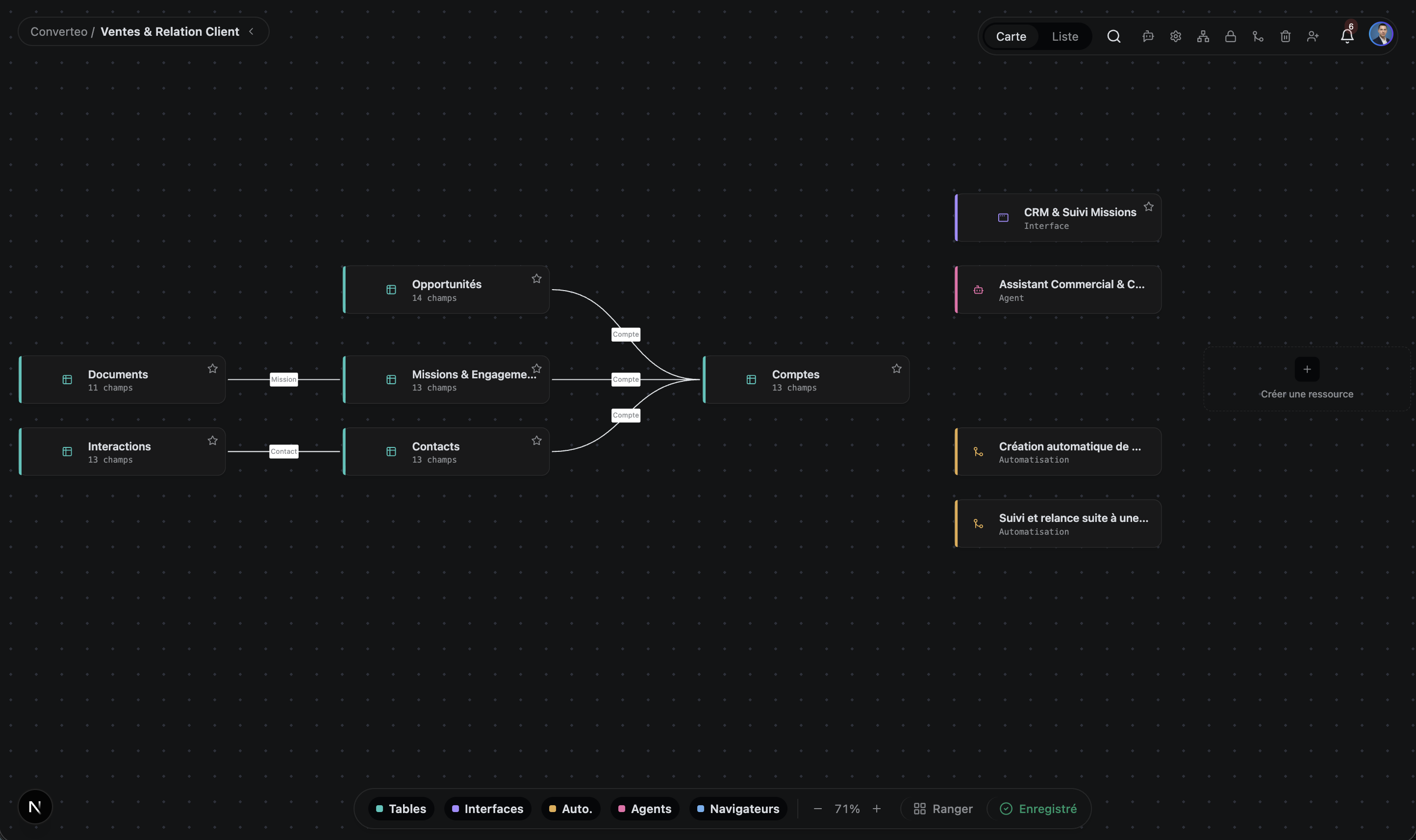
Non sono mockup: screenshot dell'interfaccia reale, con dati reali.
Panoramica
Una piattaforma, sei superfici
I vostri dati strutturati diventano software funzionante, senza uscire dalla piattaforma.
Tabelle
Base con più tabelle, 28 tipi di campo, record collegati, formule con oltre 200 funzioni, rollup e lookup. Ogni cella viene scritta in una vera tabella PostgreSQL, senza formato proprietario.
App
Un App Builder per pubblicare una mini-app personalizzata con la propria autenticazione dei visitatori e un'API iniettata per leggere e scrivere record.
Automazioni
Workflow attivati da eventi o da cron, a più passaggi, con fasi di approvazione umana dove servono. Workflow illimitati; le esecuzioni mensili dipendono dal piano — vedi i prezzi.
Knowledge graph
Una biblioteca di documenti markdown con ricerca semantica e full-text fuse insieme, un grafo di collegamenti tra documenti e un chunking che rispetta la struttura del markdown.
Agenti IA
Agenti autonomi con pianificatore, esecutore, memoria persistente e scheduler. Leggono e scrivono i tuoi dati e agiscono sui servizi collegati — Gmail, GitHub, Slack, Google Calendar.
OpenAI, Anthropic, Google, Azure, DeepSeek, Mistral, Groq, Cohere o i tuoi modelli locali tramite Ollama e LM Studio.
Computer use
Quando un servizio non ha un'API, l'agente guida un browser: apre la pagina, compila il modulo, prende il risultato e lo riscrive nella tua tabella. Ogni sessione viene registrata e resta verificabile.
Funziona con i modelli che usi già
Cloud o locali, collegati con le tue chiavi API — nessun vincolo di fornitore.
- OpenAI
- Anthropic
- Mistral
- Ollama
- + altri 5
Sei modi per vedere la stessa tabella
Cambiate vista senza duplicare nemmeno una riga di dati.
Griglia
Navigazione e modifica in stile foglio di calcolo
Kanban
Flussi basati sullo stato, bacheche di progetto
Galleria
Record ricchi di immagini, cataloghi visivi
Calendario
Dati guidati dalle date, pianificazione
Gantt
Tempistiche di progetto, dipendenze, percorso critico
Modulo
Raccogliere dati da utenti esterni, tramite URL pubblico
Perché TblFlow
Quello che gli altri strumenti non fanno.
Vero PostgreSQL, non un livello di sincronizzazione
La tabella che vedi in TblFlow è la tabella in Postgres. Puoi puntare qualsiasi client SQL sulla stessa istanza e interrogare i tuoi dati direttamente. Non c'è un intermediario.
Agenti che agiscono, non solo rispondono
Airtable, Monday e Notion non hanno agenti autonomi. TblFlow sì: osservano i tuoi dati e agiscono — inviare un'email quando un'opportunità cambia fase, aprire una issue su GitHub, riassumere la settimana ogni venerdì.
Self-hostable, senza lock-in
Il piano Enterprise si distribuisce sulla tua infrastruttura o in un VPC dedicato, su preventivo, con tutte le funzionalità sbloccate. I tuoi dati restano in Postgres standard: un pg_dump è un backup completo, riutilizzabile altrove senza conversione.
Progettato per volumi di produzione
Filtra, ordina, raggruppa e cerca su milioni di righe in meno di un secondo. La griglia viene disegnata su canvas e ridisegna solo l'area visibile, quindi le prestazioni non peggiorano al crescere delle righe.
API-first, dalla tua primissima base
Ogni base che crei in TblFlow è automaticamente raggiungibile tramite un'API REST documentata (OpenAPI), con autenticazione tramite token. Non c'è nessun piano da sbloccare: è disponibile già dal piano Gratuito.
Confronto
Un confronto dettagliato per ogni strumento, con criteri verificabili e i casi in cui l’altro prodotto vince.
Prezzi
Iniziate gratis. Cambiate piano quando il team cresce.
Gratuito
Per fare prove e per progetti personali.
Inizia0 €/mese
- 1 base · 1 spazio · 1 utente
- 1 GB di spazio · 5000 righe per tabella
- Agenti IA e automazioni illimitati nel numero — 100 esecuzioni/mese
- Supporto della community
- Il più scelto
Pro
Per piccoli team che automatizzano.
Inizia29 €/mese
≈ 26,58 €/mese
fatturazione mensilefatturazione annuale (319 €/anno)
- 5 base · 3 utenti
- 100 GB di spazio · 100.000 righe per tabella
- Agenti IA e automazioni illimitati nel numero — 5000 esecuzioni/mese
- Supporto via email · SLA 99,5%
Business
Per team che ci gestiscono le proprie operazioni.
Inizia99 €/mese
90,75 €/mese
fatturazione mensilefatturazione annuale (1089 €/anno)
- 30 base · 10 utenti
- 500 GB di spazio · 1.000.000 di righe per tabella
- Agenti IA e automazioni illimitati nel numero — 50.000 esecuzioni/mese
- SSO / SAML · white-label · audit avanzato
- Supporto prioritario · SLA 99,9%
Enterprise
Sulla tua infrastruttura o in un VPC dedicato.
ContattaciSu preventivo
- Tutto illimitato
- Deployment on-premise o VPC
- SSO / SAML · white-label
- Supporto dedicato 24/7 · SLA 99,99%
Domande frequenti
Le domande che ci fanno più spesso.
Che cos'è TblFlow?
TblFlow è una piattaforma di database no-code che mette un'interfaccia in stile foglio di calcolo sopra un vero database PostgreSQL. I team la usano per costruire tabelle, interfacce e dashboard, automazioni, una biblioteca di documenti con ricerca semantica e agenti IA autonomi, tutto sugli stessi dati. TblFlow è disponibile come servizio gestito su tblflow.com e come installazione self-hosted.
In cosa TblFlow è diverso da Airtable?
TblFlow si differenzia da Airtable su quattro punti. Primo, i dati vivono in un vero database PostgreSQL che puoi interrogare in SQL da qualsiasi client, mentre Airtable non espone accesso SQL. Secondo, TblFlow include agenti IA autonomi che agiscono sui tuoi dati e sui servizi collegati, assenti in Airtable. Terzo, aggiunge la ricerca semantica su una biblioteca di documenti. Quarto, TblFlow può essere self-hosted sulla tua infrastruttura, cosa che Airtable non offre.
Quali tipi di vista offre TblFlow?
TblFlow offre sette tipi di vista su qualsiasi tabella, senza duplicare i dati: Griglia, Kanban, Galleria, Calendario, Gantt, Modulo e Plugin. La vista Gantt gestisce le tempistiche di progetto, le dipendenze tra attività e il percorso critico. La vista Modulo genera un URL pubblico per raccogliere dati da persone esterne al team.
Cosa possono fare gli agenti IA di TblFlow?
Gli agenti TblFlow sono autonomi: hanno un pianificatore, un esecutore, una memoria persistente sotto forma di grafo entità/relazioni e uno scheduler. Leggono e scrivono i tuoi record, interrogano la tua biblioteca di documenti come contesto e agiscono sui servizi collegati — Gmail, GitHub, Slack, Google Calendar, Drive e Meet. Puoi anche fornire loro strumenti personalizzati generati da qualsiasi specifica OpenAPI, o scrivere i tuoi strumenti JavaScript eseguiti in sandbox.
Quanto costa TblFlow?
TblFlow Cloud ha quattro piani. Il piano Gratuito copre 1 base e 1 utente. Il piano Pro costa 29 € al mese e copre 5 base e 3 utenti. Il piano Business costa 99 € al mese e copre 30 base e 10 utenti. Il piano Enterprise è su preventivo, rimuove ogni limite e copre anche il deployment sulla tua infrastruttura o in un VPC dedicato.
TblFlow ha un piano gratuito?
Sì. TblFlow Cloud ha un piano Gratuito permanente con 1 base, 1 utente, 1 GB di spazio e agenti IA, automazioni e richieste API illimitati, senza carta di credito. Il deployment sulla tua infrastruttura fa parte del piano Enterprise, su preventivo.
Quale database usa TblFlow?
TblFlow usa PostgreSQL, con l'estensione pgvector per la ricerca semantica e Redis per la cache e le code di lavori in background. Ogni tabella che crei in TblFlow è una vera tabella PostgreSQL fisica, non una riga in un archivio generico: per questo puoi interrogare i tuoi dati direttamente in SQL.
TblFlow ha un’API?
Sì. TblFlow espone un'API REST documentata da una specifica OpenAPI, con autenticazione tramite token. Nelle app pubblicate con l'App Builder viene inoltre iniettata un'API JavaScript, così il tuo codice può leggere e scrivere record.
Quali provider di IA supporta TblFlow?
TblFlow supporta OpenAI, Anthropic, Google Gemini, Azure OpenAI, DeepSeek, Mistral, Groq, Cohere, qualsiasi endpoint compatibile con OpenAI e i modelli locali tramite Ollama e LM Studio. Provider e modelli si configurano per base, con le tue chiavi API.
Quante righe può gestire TblFlow?
TblFlow filtra, ordina, raggruppa e cerca su milioni di righe con tempi di risposta inferiori al secondo: la griglia viene disegnata su canvas e ridisegna solo l'area visibile, quindi le prestazioni di visualizzazione non peggiorano al crescere delle righe. Le righe per tabella dipendono invece dal piano: 5000 sul piano Gratuito, fino a 1.000.000 su Business, illimitate su Enterprise — il dettaglio completo è sulla pagina prezzi.
Dove sono archiviati i miei dati?
Dipende dal tipo di deployment. Su TblFlow Cloud i tuoi dati stanno nell'infrastruttura gestita da TblFlow. In self-hosted o su Enterprise dedicato stanno nel tuo PostgreSQL, sulla tua infrastruttura o in un VPC dedicato, e TblFlow non vi ha accesso. In entrambi i casi i dati sono archiviati in PostgreSQL standard, senza formato proprietario.
Posso esportare i miei dati e andarmene?
Sì, e senza passaggi di conversione. I tuoi dati stanno già in tabelle PostgreSQL standard: basta un `pg_dump` e si importa in qualsiasi Postgres. Non c'è un formato proprietario da convertire né un livello di sincronizzazione da districare. È questo che significa «nessun vincolo di fornitore» su questo sito.
TblFlow è conforme al GDPR?
TblFlow è progettato per un uso conforme al GDPR e fornisce un registro di audit, una cronologia delle revisioni, permessi granulari e la gestione del consenso. In self-hosted o su Enterprise dedicato controlli completamente la localizzazione dei dati, il che semplifica la conformità per le organizzazioni con requisiti di residenza dei dati.
Nessuna domanda corrisponde a questa ricerca.
Pronti a trasformare i vostri dati in software?
Create la vostra prima base in pochi minuti.