Ask it, build it, automate it, own it.
Ekipler için modern veritabanı arayüzü
İhtiyacınızı tarif edin: yapay zeka ajanları ve otomasyonlar gerisini halleder, gerçek PostgreSQL üzerinde. Tamamen yönetilen ya da kendi sunucularınızda.
Ücretsiz başla- satır / veritabanı
- Milyonlarca
- görünüm türü
- 6
- alan türü
- 28
- başlamak için
- 5 dakika
- Neye ihtiyacınız olduğunu anlatın
- Veri şeması
- Bağlantılı tablolar
- Arayüzler
- Otomasyonlar
- Yapay zekâ ajanları
- Kendi alan adınızda yayın
Üretim hattı
İhtiyaçtan uygulamaya, tek bir sohbette
Veriler aşamadan aşamaya geçer: her öneri, bir sonraki başlamadan önce onaylanır.
Analiz
Blueprint
Tablolar
İlişkiler
Arayüz
Otomasyonlar
Yapay zekâ ajanları
Bu gerçekten TblFlow
Maket değil: gerçek arayüzün, gerçek verilerle alınmış ekran görüntüleri.
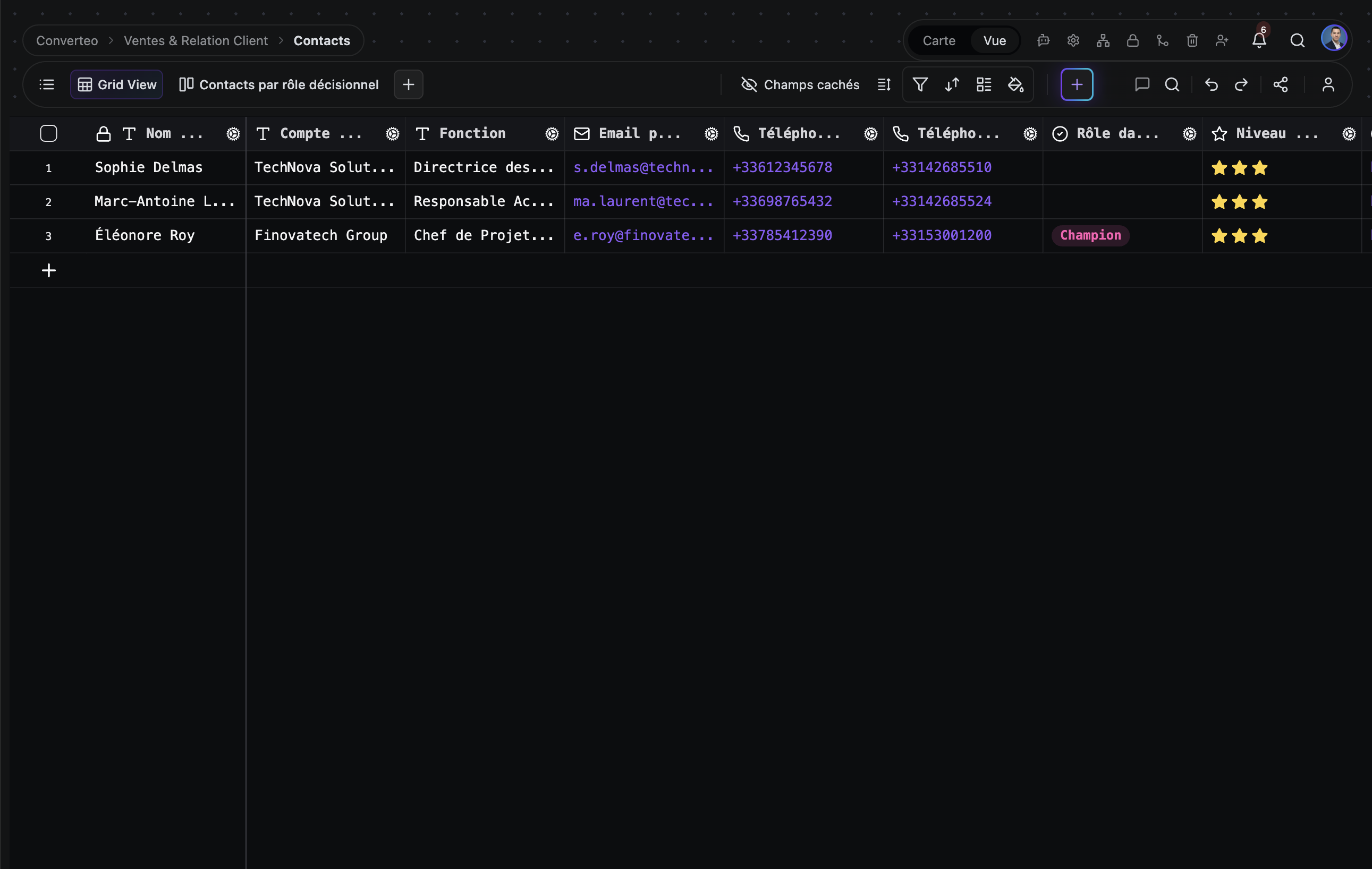
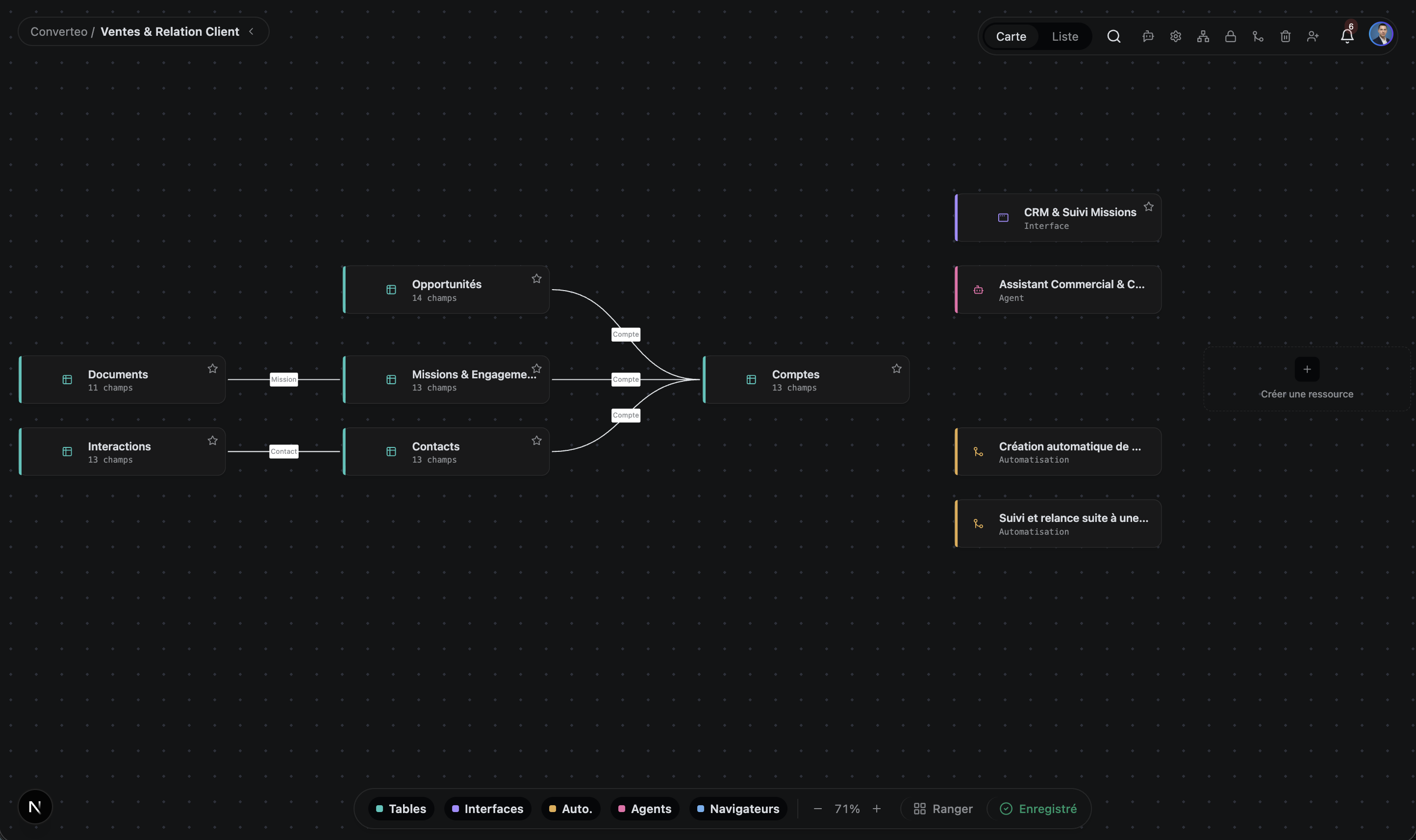
Genel bakış
Tek platform, altı yüzey
Yapılandırılmış verileriniz, platformdan ayrılmadan çalışan yazılıma dönüşür.
Tablolar
Birden çok tablo içeren base'ler, 28 alan türü, bağlantılı kayıtlar, 200'den fazla işlevli formüller, rollup ve lookup. Her hücre, tescilli bir biçim olmadan gerçek bir PostgreSQL tablosuna yazılır.
Uygulamalar
Kendi ziyaretçi kimlik doğrulamasına ve kayıtları okuyup yazmak için enjekte edilen bir API'ye sahip özel bir mini uygulama yayımlamak için App Builder.
Otomasyonlar
Olay tabanlı ve cron tetiklemeli, çok adımlı iş akışları; gereken yerlerde insan onayı adımlarıyla. İş akışı sayısı sınırsız; aylık çalıştırma sayısı pakete bağlıdır — fiyatlara bakın.
Bilgi grafiği
Anlamsal arama ile tam metin aramasının birleştirildiği bir markdown doküman kitaplığı; dokümanlar arası bağlantı grafiği ve markdown yapısına saygılı bir parçalama ile.
Yapay zekâ ajanları
Planlayıcı, yürütücü, kalıcı bellek ve zamanlayıcıya sahip otonom ajanlar. Verilerinizi okur ve yazar, bağlı servisleriniz arasında işlem yapar — Gmail, GitHub, Slack, Google Takvim.
OpenAI, Anthropic, Google, Azure, DeepSeek, Mistral, Groq, Cohere veya Ollama ve LM Studio üzerinden kendi yerel modelleriniz.
Computer use
Bir servisin API'si yoksa ajan bir tarayıcıyı sürer: sayfayı açar, formu doldurur, sonucu alır ve tablonuza geri yazar. Her oturum kaydedilir ve denetlenebilir kalır.
Zaten kullandığınız modellerle çalışır
Bulutta ya da yerelde, kendi API anahtarlarınızla bağlanır — sağlayıcıya bağımlılık yok.
- OpenAI
- Anthropic
- Mistral
- Ollama
- + 5 tane daha
Aynı tabloyu görmenin altı yolu
Tek bir veri satırını bile çoğaltmadan görünüm değiştirin.
Izgara
Elektronik tablo tarzı gezinme ve düzenleme
Kanban
Duruma dayalı iş akışları, proje panoları
Galeri
Görsel ağırlıklı kayıtlar, görsel kataloglar
Takvim
Tarihe dayalı veriler, planlama
Gantt
Proje zaman çizelgeleri, bağımlılıklar, kritik yol
Form
Herkese açık URL üzerinden dış kullanıcılardan veri toplama
Neden TblFlow
Diğer araçların yapmadıkları.
Gerçek PostgreSQL, senkronizasyon katmanı değil
TblFlow'da gördüğünüz tablo, Postgres'teki tablonun ta kendisidir. Aynı örneğe herhangi bir SQL istemcisi bağlayıp verilerinizi doğrudan sorgulayabilirsiniz. Arada bir aracı yoktur.
Yalnızca yanıtlamakla kalmayıp harekete geçen ajanlar
Airtable, Monday ve Notion'da otonom ajan yoktur. TblFlow'da vardır: verilerinizi izler ve harekete geçerler — bir fırsat aşama değiştirdiğinde e-posta göndermek, GitHub'da issue açmak, her cuma haftayı özetlemek.
Kendi sunucunuzda barındırılabilir, bağımlılık yok
Enterprise paketi, teklife bağlı olarak kendi altyapınıza veya özel bir VPC'ye dağıtılır ve tüm özellikler açıktır. Verileriniz standart Postgres'te kalır: bir pg_dump eksiksiz bir yedektir ve başka bir yerde dönüştürme olmadan kullanılabilir.
Üretim hacimleri için tasarlandı
Milyonlarca satırda bir saniyenin altında filtreleyin, sıralayın, gruplayın ve arayın. Izgara canvas üzerine çizilir ve yalnızca görünen bölgeyi yeniden çizer, böylece satır sayısıyla birlikte performans düşmez.
İlk base'inizden itibaren API-first
TblFlow'da oluşturduğunuz her base, token kimlik doğrulamalı, belgelenmiş bir REST API (OpenAPI) üzerinden otomatik olarak erişilebilir. Bunun için paket yükseltmeye gerek yok — ücretsiz paketten itibaren kullanılabilir.
Karşılaştırma
Her araç için doğrulanabilir kriterlerle ve diğer ürünün kazandığı durumları da içeren ayrıntılı bir karşılaştırma.
Fiyatlandırma
Ücretsiz başlayın. Ekibiniz büyüdükçe plan değiştirin.
Ücretsiz
Denemek ve kişisel projeler için.
Başla$0/ay
- 1 base · 1 alan · 1 kullanıcı
- 1 GB depolama · tablo başına 5.000 satır
- Sayıca sınırsız yapay zekâ ajanı ve otomasyon — ayda 100 çalıştırma
- Topluluk desteği
- En çok tercih edilen
Pro
Otomasyon yapan küçük ekipler için.
Başla$29/ay
≈ $26,58/ay
aylık faturalandırılıryıllık faturalandırılır ($319/yıl)
- 5 base · 3 kullanıcı
- 100 GB depolama · tablo başına 100.000 satır
- Sayıca sınırsız yapay zekâ ajanı ve otomasyon — ayda 5.000 çalıştırma
- E-posta desteği · %99,5 SLA
Business
Operasyonlarını bunun üzerinde yürüten ekipler için.
Başla$99/ay
$90,75/ay
aylık faturalandırılıryıllık faturalandırılır ($1.089/yıl)
- 30 base · 10 kullanıcı
- 500 GB depolama · tablo başına 1.000.000 satır
- Sayıca sınırsız yapay zekâ ajanı ve otomasyon — ayda 50.000 çalıştırma
- SSO / SAML · white-label · gelişmiş denetim
- Öncelikli destek · %99,9 SLA
Enterprise
Kendi altyapınızda veya özel bir VPC'de.
Bize ulaşınTeklif alın
- Her şey sınırsız
- On-premise veya VPC dağıtımı
- SSO / SAML · white-label
- 7/24 özel destek · %99,99 SLA
Sık sorulan sorular
Bize en çok sorulanlar.
TblFlow nedir?
TblFlow, gerçek bir PostgreSQL veritabanının üzerine elektronik tablo benzeri bir arayüz koyan no-code bir veritabanı platformudur. Ekipler bununla tablolar, arayüzler ve panolar, otomasyonlar, anlamsal aramalı bir doküman kitaplığı ve otonom yapay zekâ ajanları kurar — hepsi aynı veriler üzerinde. TblFlow, tblflow.com üzerinde yönetilen bir hizmet olarak ve kendi sunucunuzda barındırılabilir şekilde sunulur.
TblFlow, Airtable'dan nasıl farklı?
TblFlow, Airtable'dan dört noktada ayrılır. Birincisi, veriler herhangi bir istemciden SQL ile sorgulayabileceğiniz gerçek bir PostgreSQL veritabanında durur; Airtable SQL erişimi sunmaz. İkincisi, TblFlow verileriniz ve bağlı servisleriniz üzerinde çalışan otonom yapay zekâ ajanları içerir, Airtable'da bunlar yoktur. Üçüncüsü, bir doküman kitaplığı üzerinde anlamsal arama ekler. Dördüncüsü, TblFlow kendi altyapınızda barındırılabilir; Airtable bunu sunmaz.
TblFlow hangi görünüm türlerini sunar?
TblFlow, veriyi çoğaltmadan her tabloda yedi görünüm türü sunar: Izgara, Kanban, Galeri, Takvim, Gantt, Form ve Eklenti. Gantt görünümü proje zaman çizelgelerini, görev bağımlılıklarını ve kritik yolu ele alır. Form görünümü, ekibiniz dışındaki kişilerden veri toplamak için herkese açık bir URL üretir.
TblFlow yapay zekâ ajanları neler yapabilir?
TblFlow ajanları otonomdur: bir planlayıcıya, bir yürütücüye, varlık/ilişki grafiği biçiminde kalıcı belleğe ve bir zamanlayıcıya sahiptir. Kayıtlarınızı okur ve yazar, doküman kitaplığınızı bağlam olarak sorgular ve bağlı servisler üzerinde işlem yapar — Gmail, GitHub, Slack, Google Takvim, Drive ve Meet. Ayrıca herhangi bir OpenAPI belirtiminden üretilmiş özel araçlar verebilir ya da yalıtılmış ortamda çalışan kendi JavaScript araçlarınızı yazabilirsiniz.
TblFlow ne kadar?
TblFlow Cloud dört pakete sahiptir. Ücretsiz paket 1 base ve 1 kullanıcıyı kapsar. Pro paketi ayda $29 olup 5 base ve 3 kullanıcıyı kapsar. Business paketi ayda $99 olup 30 base ve 10 kullanıcıyı kapsar. Enterprise paketi teklife bağlıdır, tüm sınırları kaldırır ve kendi altyapınızda ya da özel bir VPC üzerinde dağıtımı da kapsar.
TblFlow'un ücretsiz bir paketi var mı?
Evet. TblFlow Cloud, 1 base, 1 kullanıcı, 1 GB depolama ve sınırsız yapay zekâ ajanı, otomasyon ve API isteği içeren kalıcı bir ücretsiz pakete sahiptir; kredi kartı gerekmez. Kendi altyapınıza dağıtım, teklife bağlı Enterprise paketinin bir parçasıdır.
TblFlow hangi veritabanını kullanıyor?
TblFlow, PostgreSQL kullanır; anlamsal arama için pgvector eklentisini, önbellek ve arka plan iş kuyrukları için Redis’i kullanır. TblFlow’da oluşturduğunuz her tablo, genel bir deponun içindeki bir satır değil, gerçek bir fiziksel PostgreSQL tablosudur — verilerinizi doğrudan SQL ile sorgulayabilmenizin nedeni budur.
TblFlow'un API'si var mı?
Evet. TblFlow, OpenAPI belirtimiyle belgelenmiş, token kimlik doğrulamalı bir REST API sunar. App Builder ile yayımlanan uygulamalara ayrıca bir JavaScript API'si enjekte edilir; böylece kendi kodunuz kayıtları okuyup yazabilir.
TblFlow hangi yapay zekâ sağlayıcılarını destekler?
TblFlow; OpenAI, Anthropic, Google Gemini, Azure OpenAI, DeepSeek, Mistral, Groq, Cohere, OpenAI uyumlu herhangi bir uç noktayı ve Ollama ile LM Studio üzerinden yerel modelleri destekler. Sağlayıcılar ve modeller, kendi API anahtarlarınızla base başına yapılandırılır.
TblFlow kaç satırı kaldırabilir?
TblFlow, milyonlarca satır üzerinde saniyenin altında yanıt süreleriyle filtreler, sıralar, gruplar ve arar: ızgara canvas üzerine çizilir ve yalnızca görünen bölgeyi yeniden çizer, bu yüzden satır sayısı arttıkça görüntüleme performansı düşmez. Tablo başına satır sayısı ise pakete bağlıdır: Ücretsiz pakette 5.000, Business'ta 1.000.000'a kadar, Enterprise'da sınırsız — paket bazındaki ayrıntı için fiyatlar sayfasına bakın.
Verilerim nerede saklanıyor?
Bu, dağıtım biçimine bağlıdır. TblFlow Cloud'da verileriniz TblFlow tarafından yönetilen altyapıda durur. Kendi sunucunuzda barındırılan ya da özel Enterprise kurulumda ise kendi PostgreSQL'inizde, kendi altyapınızda veya özel bir VPC içinde durur; TblFlow bunlara erişemez. Her iki durumda da veriler, tescilli bir biçim olmadan standart PostgreSQL'de saklanır.
Verilerimi dışa aktarıp ayrılabilir miyim?
Evet, üstelik dönüştürme adımı olmadan. Verileriniz zaten standart PostgreSQL tablolarında duruyor; bir `pg_dump` yeterli ve herhangi bir Postgres'e aktarılabiliyor. Dönüştürülecek tescilli bir biçim ya da çözülecek bir senkronizasyon katmanı yok. Bu sitedeki «sağlayıcıya bağımlılık yok» ifadesi bunu anlatıyor.
TblFlow GDPR uyumlu mu?
TblFlow, GDPR uyumlu kullanım için tasarlanmıştır; denetim günlüğü, revizyon geçmişi, ayrıntılı izinler ve onay yönetimi sunar. Kendi sunucunuzda barındırılan ya da özel Enterprise kurulumda verilerin konumunu tümüyle siz denetlersiniz; bu da veri ikametgâhı gereksinimi olan kurumlar için uyumu kolaylaştırır.
Bu aramayla eşleşen soru yok.
Verilerinizi yazılıma dönüştürmeye hazır mısınız?
İlk veritabanınızı birkaç dakikada oluşturun.