Ask it, build it, automate it, own it.
チームのためのモダンなデータベースUI
必要なことを伝えるだけ。AIエージェントと自動化が残りを処理します。本物のPostgreSQL上で、フルマネージドでも自社サーバーでも。
無料ではじめる- 行/ベース
- 数百万
- ビュータイプ
- 6
- フィールドタイプ
- 28
- で開始
- 5分
- 必要なことを伝える
- データスキーマ
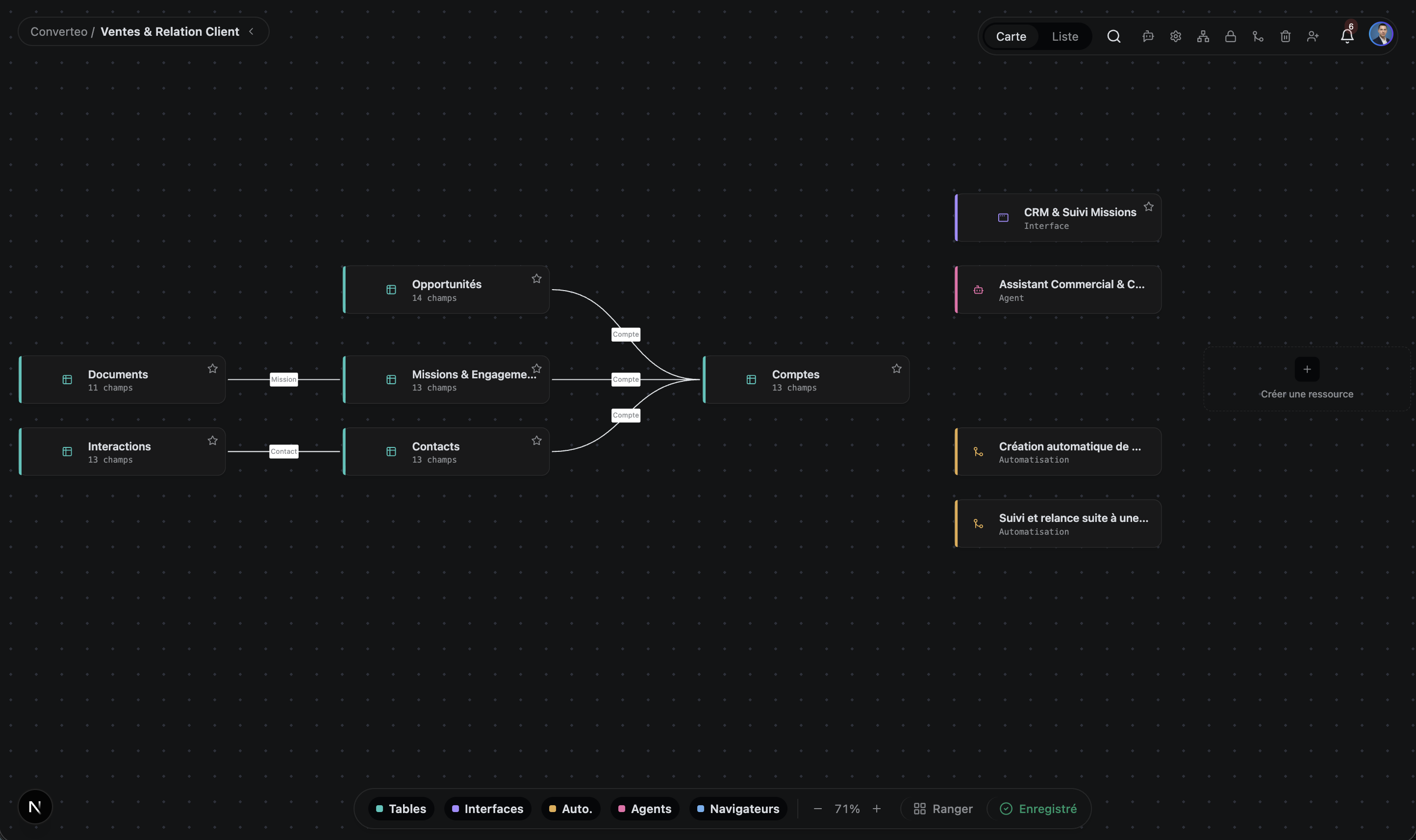
- リンクされたテーブル
- インターフェース
- 自動化
- AI エージェント
- 自社ドメインで公開
生成パイプライン
ニーズからアプリまで、ひとつの会話で
データは段階から段階へと流れます。各提案は、次に進む前に承認されます。
分析
ブループリント
テーブル
リレーション
インターフェース
自動化
AI エージェント
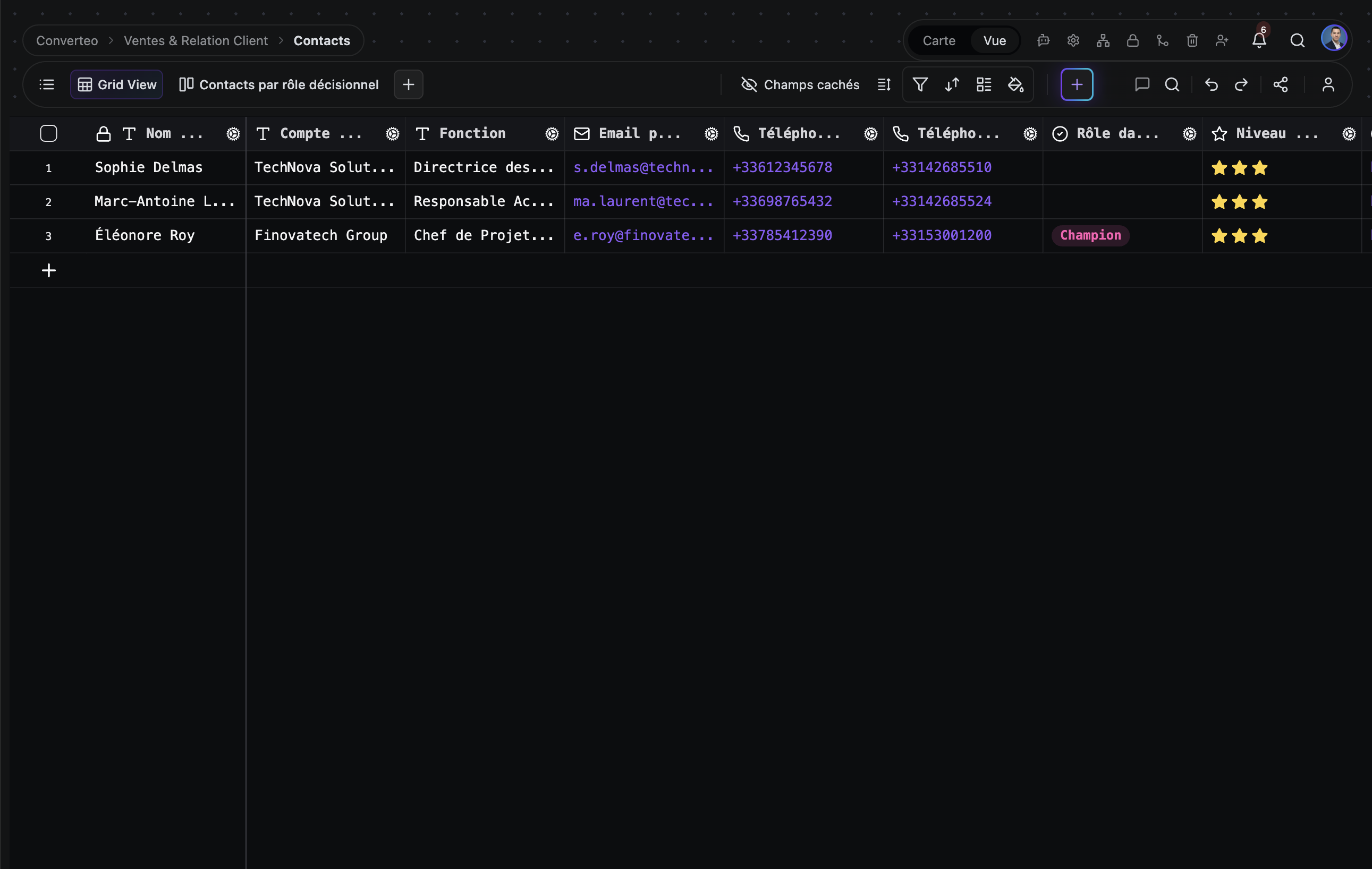
これは本物の TblFlow です
モックアップではありません。実際のインターフェースを実データで撮影したスクリーンショットです。
概要
ひとつのプラットフォーム、6つの機能面
構造化されたデータが、プラットフォームを離れることなく動くソフトウェアになります。
テーブル
複数テーブルを含むベース、28 種類のフィールド、リンクレコード、200 以上の関数を備えた数式、ロールアップとルックアップ。すべてのセルは独自形式ではなく、実在する PostgreSQL テーブルに書き込まれます。
アプリ
独自の訪問者認証と、レコードの読み書き用に注入される API を備えたミニアプリを公開できる App Builder。
自動化
イベント駆動と cron 起動のワークフロー。複数ステップで、必要な箇所には人による承認ステップを挟めます。ワークフローの数は無制限で、月あたりの実行回数はプランによります(料金ページを参照)。
ナレッジグラフ
セマンティック検索と全文検索を統合した Markdown ドキュメントライブラリ。ドキュメント間のリンクグラフと、Markdown の構造を尊重したチャンク分割を備えます。
AI エージェント
プランナー、実行エンジン、永続メモリ、スケジューラを備えた自律型エージェント。データを読み書きし、連携サービス(Gmail、GitHub、Slack、Google カレンダー)をまたいで動作します。
OpenAI、Anthropic、Google、Azure、DeepSeek、Mistral、Groq、Cohere、または Ollama や LM Studio 経由の自前のローカルモデル。
Computer use
サービスに API がない場合、エージェントがブラウザを操作します。ページを開き、フォームに入力し、結果を取得してテーブルに書き戻します。各セッションは記録され、あとから検証できます。
すでにお使いのモデルに対応
クラウドでもローカルでも、自分の API キーで接続。特定のプロバイダーに縛られません。
- OpenAI
- Anthropic
- Mistral
- Ollama
- ほか 5 件
同じテーブルを見る6つの方法
データを一行も複製せずにビューを切り替えられます。
グリッド
表計算のような閲覧と編集
カンバン
ステータス別のワークフロー、プロジェクトボード
ギャラリー
画像中心のレコード、ビジュアルカタログ
カレンダー
日付が軸になるデータ、スケジューリング
ガント
プロジェクトの日程、依存関係、クリティカルパス
フォーム
公開 URL を通じて、社外のユーザーから入力を集める
TblFlowが選ばれる理由
他のツールにはできないこと。
本物の PostgreSQL、同期レイヤーではありません
TblFlow で見えているテーブルは、そのまま Postgres のテーブルです。同じインスタンスに任意の SQL クライアントを接続して、データを直接問い合わせできます。間に挟まるものはありません。
答えるだけでなく、実行するエージェント
Airtable、Monday、Notion に自律型エージェントはありません。TblFlow にはあります。データを監視して行動します。商談のステージが変わったらメールを送る、GitHub の issue を作る、毎週金曜に一週間をまとめる、といった具合です。
セルフホスト可能、ロックインなし
Enterprise プランは、自社インフラまたは専用 VPC に配置でき(見積制)、すべての機能が利用できます。データは標準の Postgres のままなので、pg_dump がそのまま完全なバックアップになり、変換なしで別の場所でも使えます。
本番規模のデータ量に対応
数百万行に対して、1 秒未満でフィルタ、並べ替え、グループ化、検索ができます。グリッドは canvas に描画され、表示中の領域だけを再描画するため、行数が増えても性能は落ちません。
最初のベースから API ファースト
TblFlow で作成したすべてのベースは、トークン認証付きのドキュメント化された REST API(OpenAPI)から自動的に利用できます。そのために上位プランへ上げる必要はなく、無料プランから使えます。
比較
ツールごとの詳細な比較。検証可能な基準と、他社製品が優れているケースも掲載。
料金
無料ではじめて、チームの成長に合わせてプランを変更できます。
無料
試用と個人プロジェクト向け。
始める$0/月
- ベース 1 · スペース 1 · ユーザー 1
- ストレージ 1 GB · 1 テーブルあたり 5,000 行
- AI エージェントと自動化は数に制限なし — 月 100 回の実行
- コミュニティサポート
- 人気No.1
Pro
自動化に取り組む小規模チーム向け。
始める$29/月
≈ $26.58/月
月額請求年額請求 ($319/年)
- ベース 5 · ユーザー 3
- ストレージ 100 GB · 1 テーブルあたり 100,000 行
- AI エージェントと自動化は数に制限なし — 月 5,000 回の実行
- メールサポート · SLA 99.5%
Business
業務そのものを TblFlow で回すチーム向け。
始める$99/月
$90.75/月
月額請求年額請求 ($1,089/年)
- ベース 30 · ユーザー 10
- ストレージ 500 GB · 1 テーブルあたり 1,000,000 行
- AI エージェントと自動化は数に制限なし — 月 50,000 回の実行
- SSO / SAML · ホワイトラベル · 高度な監査
- 優先サポート · SLA 99.9%
Enterprise
自社インフラまたは専用 VPC 上で。
お問い合わせ要お問い合わせ
- すべて無制限
- オンプレミスまたは VPC への配置
- SSO / SAML · ホワイトラベル
- 24 時間 365 日の専任サポート · SLA 99.99%
よくある質問
よくいただく質問をまとめました。
TblFlow とは何ですか?
TblFlow は、本物の PostgreSQL データベースの上に表計算ソフトのようなインターフェースを載せたノーコードのデータベースプラットフォームです。チームはこの上でテーブル、画面やダッシュボード、自動化、セマンティック検索付きのドキュメントライブラリ、自律型 AI エージェントを、すべて同じデータの上に構築できます。TblFlow は tblflow.com のマネージドサービスとして、またセルフホスト型としても利用できます。
TblFlow は Airtable と何が違いますか?
TblFlow は 4 つの点で Airtable と異なります。第一に、データは本物の PostgreSQL に置かれ、任意のクライアントから SQL で問い合わせできます。Airtable は SQL アクセスを提供しません。第二に、TblFlow にはデータや連携サービスに対して動作する自律型 AI エージェントがありますが、Airtable にはありません。第三に、ドキュメントライブラリに対するセマンティック検索を備えます。第四に、TblFlow は自社インフラでセルフホストできますが、Airtable にその選択肢はありません。
TblFlow にはどのようなビューがありますか?
TblFlow はどのテーブルにも 7 種類のビューを提供し、データを複製しません。グリッド、カンバン、ギャラリー、カレンダー、ガント、フォーム、プラグインです。ガントビューはプロジェクトの日程、タスクの依存関係、クリティカルパスを扱います。フォームビューは、チーム外の人からデータを集めるための公開 URL を生成します。
TblFlow の AI エージェントは何ができますか?
TblFlow のエージェントは自律的で、プランナー、実行エンジン、エンティティ/リレーションのグラフとして保持される永続メモリ、スケジューラを備えます。レコードの読み書きを行い、ドキュメントライブラリを文脈として参照し、連携サービス(Gmail、GitHub、Slack、Google カレンダー、Drive、Meet)に対して操作します。任意の OpenAPI 仕様から生成したカスタムツールを与えることも、サンドボックスで動く独自の JavaScript ツールを書くこともできます。
TblFlow の料金はいくらですか?
TblFlow Cloud には 4 つのプランがあります。無料プランはベース 1 つとユーザー 1 名が対象です。Pro プランは月額 $29 で、ベース 5 つとユーザー 3 名が対象です。Business プランは月額 $99 で、ベース 30 とユーザー 10 名が対象です。Enterprise プランは見積制で、すべての上限がなくなり、自社インフラや専用 VPC への配置にも対応します。
TblFlow に無料プランはありますか?
はい。TblFlow Cloud には恒久的な無料プランがあり、ベース 1 つ、ユーザー 1 名、ストレージ 1 GB、そして数に制限のない AI エージェント・自動化・API リクエストが含まれます。クレジットカードは不要です。自社インフラへの配置は Enterprise プラン(見積制)に含まれます。
TblFlow はどのデータベースを使っていますか?
TblFlow は PostgreSQL を使用し、セマンティック検索には pgvector 拡張、キャッシュとバックグラウンドジョブのキューには Redis を使います。TblFlow で作成する各テーブルは、汎用ストア内の 1 行ではなく、実在する物理的な PostgreSQL テーブルです。だからこそ、SQL で直接データを問い合わせできます。
TblFlow に API はありますか?
はい。TblFlow は OpenAPI 仕様で文書化された REST API を提供し、トークン認証に対応します。App Builder で公開したアプリには JavaScript API も注入され、自分のコードからレコードを読み書きできます。
TblFlow はどの AI プロバイダーに対応していますか?
TblFlow は OpenAI、Anthropic、Google Gemini、Azure OpenAI、DeepSeek、Mistral、Groq、Cohere、OpenAI 互換の任意のエンドポイント、そして Ollama や LM Studio 経由のローカルモデルに対応します。プロバイダーとモデルはベースごとに、ご自身の API キーで設定します。
TblFlow はどれくらいの行数を扱えますか?
TblFlow は数百万行に対するフィルタ、並べ替え、グループ化、検索を 1 秒未満の応答で行います。グリッドは canvas に描画され、表示中の領域だけを再描画するため、行数が増えても表示性能は落ちません。一方、1 テーブルあたりの行数はプランによって異なります。無料プランで 5,000 行、Business で最大 1,000,000 行、Enterprise は無制限です。プランごとの詳細は料金ページをご覧ください。
私のデータはどこに保存されますか?
配置方法によって異なります。TblFlow Cloud では、データは TblFlow が運用するインフラ上にあります。セルフホストまたは専用 Enterprise では、ご自身の PostgreSQL、つまり自社インフラまたは専用 VPC 上にあり、TblFlow はアクセスできません。いずれの場合も、データは独自形式ではなく標準の PostgreSQL に保存されます。
データをエクスポートして移行できますか?
はい、変換作業なしで可能です。データはすでに標準の PostgreSQL テーブルにあるため、`pg_dump` だけで十分で、どの Postgres にもインポートできます。変換すべき独自形式も、解きほぐすべき同期レイヤーもありません。本サイトでいう「ベンダーロックインなし」とは、この意味です。
TblFlow は GDPR に準拠していますか?
TblFlow は GDPR に準拠した利用を前提に設計されており、監査ログ、変更履歴、細かな権限設定、同意管理を備えています。セルフホストまたは専用 Enterprise では、データの所在を完全に自社で管理できるため、データレジデンシー要件のある組織にとって遵守が容易になります。
この検索に一致する質問はありません。